Showing posts with label CeLT. Show all posts

Monday, 24 October 2011

The Student Resource Area

Most staff will probably be aware that we have access to a Staff Resource Area within Moodle, but did you know there is an equivalent Student Resource Area where all students are automatically enrolled?


The Student Resource Area is split into a five sections. The following descriptions are taken directly;

Skills Online


Skills Online is a resource that will support you in developing the necessary skills you need to study and progress successfully at this level. It is designed to be used to complement your programme-based teaching and learning activities.


Employability Online

Employability Online is a resource which gives you the opportunity to develop key skills that employers are looking for. It will help you to reflect on your areas of relative strength and on development.


InfoSkills


The InfoSkills Online tutorial helps develop Information Literacy skills. Self-sufficiency and effectiveness in locating, evaluating and employing good quality research information is an important life and career skill. Information Literacy has been identified as a key Graduate Competency in MMU's "Employability Curriculum Framework".


Moodle Guides & Support


Guides include how to access and navigate Moodle, editing Profiles, submitting Assignments and using Discussion Forums.


Equal Opportunities & Diversity


This programme must be completed by all students as well as staff. The module does not carry credits for your University course but completion of the programme will contribute to your continuing personal development in this key transferable skill area.


So if your students are in need of a little further online self-directed support, you  know where to send them....

Creative Commons License
This work by Peter Reed is licensed under a Creative Commons Attribution-NonCommercial 3.0 Unported License.

Thursday, 8 September 2011

Moodle Course Area Checklist

With the big changes around the University, and the increasing impetus to engage with blended and online learning, I thought it would be a good idea to develop a Checklist that would guide Unit Leaders in the development of their Moodle areas. What's great, is that it's licensed with Creative Commons!


It was important to keep the checklist as short and simple as possible, but still highlight key points to ensure a smooth and consistent student experience with the VLE. Hopefully this will help ensure a minimum standard within and across Unit areas.

I teamed up colleagues from CeLT: Rod Cullen who is well known to the Faculty, played a huge part in bringing this together and brought excellent understanding of the legal requirements around accessibility, as did Neil Ringan and Christopher Meadows.

The checklist is available from the Moodle Training Guides page of the Staff Resource Area in Moodle, and can also be accessed from from my public Dropbox.

Creative Commons License
This work by Peter Reed is licensed under a Creative Commons Attribution-NonCommercial 3.0 Unported License.

Tuesday, 26 July 2011

Good Practice in Moodle Course Design #1

Moodle can play a significant role in supporting students in their studies, so it's really important that Moodle areas are well structured to help guide learners from week to week, as well as organised to provide content in a meaningful way.

This post touches on two 'quick wins' in developing Moodle areas, and is informed by the CeLT guide: 'Good Practice for Building Moodle Course Areas'.


1. Week/Topic Headings - create a summary for each element of the teaching schedule
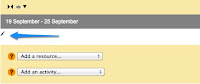
Whether your unit uses a weekly or topic based structure, it is important that the heading for each is clearly visible. You can insert a heading by clicking on the 'edit summary' button.

When inserting a Summary, there are two key things to remember:

1) Try to keep the text as short as possible (you'll see why shortly)
2) Select the text and format it to 'Heading 2'
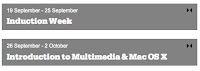

By maintaining these basic principles, you will see that the Summary text is formatted to appear as white text on a grey background (right), and is also reflected in the 'Quick Links' menu (this is why it's important to keep the text as short as possible as the menu could get extremely wide).


2. Subheadings and text - using labels to organise week/topic content

It is often very useful for students if each week/topic contains contextual information, such as a description, and links to teaching resources, activities and further reading. Labels can be used to help with this structure - from the 'Add a Resource' menu, choose 'Insert a Label'.
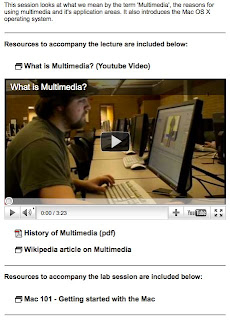

In the example on the right, I have used labels to;
  • Introduce the topic
  • Use headings (H3) to identify 'Resources to accompany the lecture', 'Resources to accompany the lab session', and 'Further Reading'
  • Embed a Youtube video on the page
  • Add a 'Horizontal Rule' to help visually organise the content. 

So as you can see, just a few simple good practice steps can set you on the road to creating great looking, well organised and accessible courses.

If you have used headings and labels innovatively in your Moodle areas, or just want to share your views, why not use the comments to this post to start a discussion....


The full Good Practice guide, along with many others, can be accessed from within Moodle > Staff Resource Area > Moodle Training Guides. Furthermore, Catherine Wasiuk (eLearning Support Officer for Hollings) has created a great guide and accompanying short video to run through 7 top tips for 'Preparing your unit areas in Moodle'.


Creative Commons License
This work by Peter Reed is licensed under a Creative Commons Attribution-NonCommercial 3.0 Unported License.